> ## Documentation Index
> Fetch the complete documentation index at: https://withseismic.com/llms.txt
> Use this file to discover all available pages before exploring further.
# definitely-not-a-robot: Humanizing Browser Automation
> How we built an npm package that makes automated browsers indistinguishable from human users
 ## How It Started
Web automation has become a cat-and-mouse game. Modern bot detection systems have learned to identify automated browsers through predictable patterns: bots click exactly 500ms after page load, mouse travels in straight lines to targets, every keystroke at identical intervals, mechanical scrolling, and zero mistakes or hesitation.
This made legitimate automation tasks increasingly difficult. Testing tools got blocked on production sites. Web scraping for research hit endless CAPTCHAs. QA automation failed due to bot detection. Monitoring tools got IP banned. Data collection became unreliable.
## Building the Solution
I built `definitely-not-a-robot`, a Puppeteer wrapper that embraces human imperfection as a feature. By introducing deliberate randomness and natural movement patterns, it makes automated browsers virtually indistinguishable from human users.
The package leverages puppeteer-extra with StealthPlugin and adds layers of human-like behaviors: Bezier curve mouse movements that arc naturally like a human hand, variable typing speeds based on ASCII key distances, random micro-movements during idle time, natural hesitation before important clicks, and debug visualization to see exactly how the "human" moves.
## The Technical Build
### Core Architecture
**Language**: TypeScript for type safety
**Bundler**: ESBuild for fast compilation
**Base**: Puppeteer-extra with StealthPlugin
**Output**: CommonJS for broad compatibility
### Key Implementations
#### Bezier Mouse Movement Algorithm
```typescript theme={null}
// Splits long movements into segments with jitter
const distance = calculateDistance(start, end);
const segments = Math.max(2, Math.min(50, Math.floor(distance / 10)));
// Natural acceleration/deceleration
const speed = 0.03 + distance * 0.001;
const acceleration = 0.002;
// Bezier control points for curved paths
const ctrlPt1 = start + Math.random() * (end - start) * 0.5;
const ctrlPt2 = end - Math.random() * (end - start) * 0.5;
```
#### ASCII-Based Typing Delays
```typescript theme={null}
// Larger key distance = longer delay
const diff = Math.abs(text.charCodeAt(i) - text.charCodeAt(i - 1));
const delay = averageDelayPerChar + diff * 2;
// Pause after punctuation
if ([".", "!", "?"].includes(char)) {
delay += 200; // Natural thinking pause
}
```
#### Jitter Movement System
* 3-95 pixel random movements
* Returns to original position
* Simulates idle hand tremor
* Configurable intensity and count
### API Design
```typescript theme={null}
const browser = new HumanBrowser();
// All methods return promises for chaining
await browser.launch({ headless: false });
await browser.navigate("https://example.com");
await browser.humanMove("#button", {
hesitationBeforeClick: true,
});
await browser.humanType("Hello World", 100); // WPM
await browser.jitterMouse({ jitterCount: 3 });
await browser.wait(1000, 5000); // Random delay
```
## What We Built
The package includes Bezier curve paths instead of straight lines, 50-150ms random click delays for natural hesitation, WPM-based typing with variable speeds (default 40 WPM), debug mode showing red path visualization, and zero dependencies beyond the Puppeteer ecosystem.
## The Results
The package is now used for QA testing - running tests on production without triggering bot detection. Web scraping teams use it for collecting public data for research and analysis. Automation developers build reliable workflows that don't break. Monitoring tools track competitor sites without getting banned.
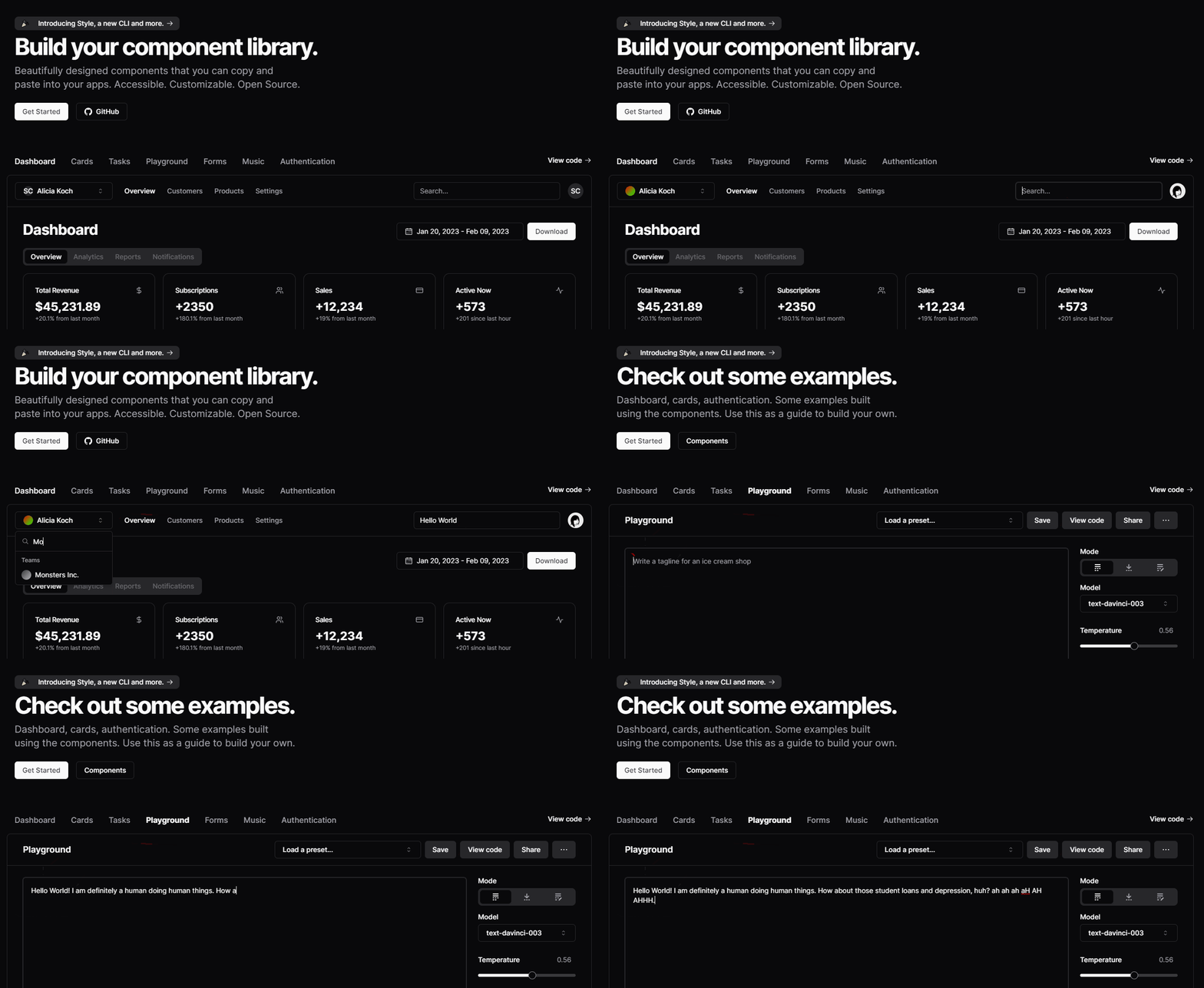
It's published on npm as `definitely-not-a-robot` with a GitHub repository containing working examples, a demo automation of shadcn/ui interface, and clear documentation with TypeScript types.
## What We Learned
**Randomness is the key.** The difference between bot and human is unpredictability. Humans don't move in straight lines. Typing speed varies based on key distance. Everyone has idle hand movements. Mistakes and corrections are natural.
**Debug visualization matters.** The red path tracing was crucial for development. We could see exactly how the mouse moves, verify Bezier curves look natural, spot mechanical patterns instantly, and tune parameters visually.
**Simplicity wins.** Rather than complex ML models, simple randomization worked better. Bezier curves for natural arcs, normal distribution for delays, ASCII distance for typing variance, basic jitter for idle movement.
What made it work was mathematical foundations (Bezier curves and easing functions), observation of how humans actually move and type, debug-first development with visual feedback, modular design with separate utilities for each behavior, and TypeScript catching edge cases during development.
The project proved simple randomization can defeat bot detection, showed legitimate use cases need human-like automation, demonstrated the importance of imperfection in automation, and set a template for ethical automation tools.
***
## Open Source
View source code and contribute
## Technologies Used
Type-safe development
Browser automation
Fast bundling
Bot evasion
Natural movement
Debug visualization
***
## Code Example
Here's how the package handles a typical automation flow:
```typescript theme={null}
import HumanBrowser from "definitely-not-a-robot";
const browser = new HumanBrowser();
await browser.launch({ headless: false });
await browser.navigate("https://ui.shadcn.com");
// Search with natural movement and typing
await browser.humanMove('input[type="search"]', {
hesitationBeforeClick: true,
debug: true, // Shows red path
});
await browser.jitterMouse({ jitterCount: 3 });
await browser.humanType("Hello World", 86); // 86 WPM
// Navigate with pauses
await browser.wait(300, 500);
await browser.humanMove('button[aria-label="Select a team"]');
// Careful typing for important fields
await browser.humanType("Monster", 30); // Slow 30 WPM
await browser.close();
```
***
## Ethical Note
While this tool can bypass bot detection, it's designed for legitimate use cases: testing, research, monitoring, and accessibility. The project includes clear disclaimers about responsible use and explicitly discourages malicious applications.
As we note in the README: "Beep Boop. We don't condone this behaviour." — But sometimes you need to test your production site without getting blocked.
***
## Frequently Asked Questions
It introduces deliberate imperfection through Bezier curve mouse movements, variable typing speeds based on key distances, random micro-movements during idle time, natural hesitation before clicks, and randomized delays. This contrasts with typical automation that moves in straight lines and acts with mechanical precision.
Instead of straight-line robot movements, the package calculates curved paths that arc naturally like a human hand would move. The algorithm splits long movements into segments with jitter, applies natural acceleration and deceleration, and uses control points to create realistic curved paths that vary each time.
Typing delays are calculated based on ASCII character distances - larger key distances result in longer delays, just like real typing. The system adds natural pauses after punctuation marks and allows you to set WPM (words per minute) rates that match human typing speeds, typically 40 WPM by default.
Debug mode shows red path visualization so you can see exactly how the mouse moves across the screen. This was crucial during development to verify that Bezier curves look natural, spot mechanical patterns instantly, and tune parameters visually. It helps developers optimize their automation to look truly human.
The package is designed for QA testing on production sites without triggering bot detection, web scraping for research and data collection, building reliable automation workflows, monitoring competitor sites, and accessibility testing. It's built for legitimate automation needs that get blocked by overzealous bot detection.
Regular Puppeteer automation moves in straight lines, clicks at exact intervals, types at consistent speeds, and acts with mechanical precision. This package adds human unpredictability - curved mouse paths, variable delays, natural hesitation, idle movements, and typing patterns based on key distances.
The package uses mathematical foundations like Bezier curves and easing functions, observation of actual human movement patterns, debug-first development with visual feedback, modular design for different behaviors, and TypeScript for catching edge cases. Simple randomization proved more effective than complex ML models.
The jitter system creates 3-95 pixel random movements that return to the original position, simulating the natural hand tremor humans have during idle time. It's configurable for intensity and count, adding another layer of human-like behavior that bots typically lack.
Instead of trying to hide automation signatures, this package embraces human imperfection as a feature. It focuses on making the automation genuinely behave like a human rather than just masking bot fingerprints. The mathematical approach to movement and timing patterns creates convincing human simulation.
Install via npm as 'definitely-not-a-robot', import the HumanBrowser class, and use methods like humanMove(), humanType(), and jitterMouse(). The package includes TypeScript types, clear documentation, working examples, and a demo automation of shadcn/ui interface. The GitHub repository has complete implementation details.
## How It Started
Web automation has become a cat-and-mouse game. Modern bot detection systems have learned to identify automated browsers through predictable patterns: bots click exactly 500ms after page load, mouse travels in straight lines to targets, every keystroke at identical intervals, mechanical scrolling, and zero mistakes or hesitation.
This made legitimate automation tasks increasingly difficult. Testing tools got blocked on production sites. Web scraping for research hit endless CAPTCHAs. QA automation failed due to bot detection. Monitoring tools got IP banned. Data collection became unreliable.
## Building the Solution
I built `definitely-not-a-robot`, a Puppeteer wrapper that embraces human imperfection as a feature. By introducing deliberate randomness and natural movement patterns, it makes automated browsers virtually indistinguishable from human users.
The package leverages puppeteer-extra with StealthPlugin and adds layers of human-like behaviors: Bezier curve mouse movements that arc naturally like a human hand, variable typing speeds based on ASCII key distances, random micro-movements during idle time, natural hesitation before important clicks, and debug visualization to see exactly how the "human" moves.
## The Technical Build
### Core Architecture
**Language**: TypeScript for type safety
**Bundler**: ESBuild for fast compilation
**Base**: Puppeteer-extra with StealthPlugin
**Output**: CommonJS for broad compatibility
### Key Implementations
#### Bezier Mouse Movement Algorithm
```typescript theme={null}
// Splits long movements into segments with jitter
const distance = calculateDistance(start, end);
const segments = Math.max(2, Math.min(50, Math.floor(distance / 10)));
// Natural acceleration/deceleration
const speed = 0.03 + distance * 0.001;
const acceleration = 0.002;
// Bezier control points for curved paths
const ctrlPt1 = start + Math.random() * (end - start) * 0.5;
const ctrlPt2 = end - Math.random() * (end - start) * 0.5;
```
#### ASCII-Based Typing Delays
```typescript theme={null}
// Larger key distance = longer delay
const diff = Math.abs(text.charCodeAt(i) - text.charCodeAt(i - 1));
const delay = averageDelayPerChar + diff * 2;
// Pause after punctuation
if ([".", "!", "?"].includes(char)) {
delay += 200; // Natural thinking pause
}
```
#### Jitter Movement System
* 3-95 pixel random movements
* Returns to original position
* Simulates idle hand tremor
* Configurable intensity and count
### API Design
```typescript theme={null}
const browser = new HumanBrowser();
// All methods return promises for chaining
await browser.launch({ headless: false });
await browser.navigate("https://example.com");
await browser.humanMove("#button", {
hesitationBeforeClick: true,
});
await browser.humanType("Hello World", 100); // WPM
await browser.jitterMouse({ jitterCount: 3 });
await browser.wait(1000, 5000); // Random delay
```
## What We Built
The package includes Bezier curve paths instead of straight lines, 50-150ms random click delays for natural hesitation, WPM-based typing with variable speeds (default 40 WPM), debug mode showing red path visualization, and zero dependencies beyond the Puppeteer ecosystem.
## The Results
The package is now used for QA testing - running tests on production without triggering bot detection. Web scraping teams use it for collecting public data for research and analysis. Automation developers build reliable workflows that don't break. Monitoring tools track competitor sites without getting banned.
It's published on npm as `definitely-not-a-robot` with a GitHub repository containing working examples, a demo automation of shadcn/ui interface, and clear documentation with TypeScript types.
## What We Learned
**Randomness is the key.** The difference between bot and human is unpredictability. Humans don't move in straight lines. Typing speed varies based on key distance. Everyone has idle hand movements. Mistakes and corrections are natural.
**Debug visualization matters.** The red path tracing was crucial for development. We could see exactly how the mouse moves, verify Bezier curves look natural, spot mechanical patterns instantly, and tune parameters visually.
**Simplicity wins.** Rather than complex ML models, simple randomization worked better. Bezier curves for natural arcs, normal distribution for delays, ASCII distance for typing variance, basic jitter for idle movement.
What made it work was mathematical foundations (Bezier curves and easing functions), observation of how humans actually move and type, debug-first development with visual feedback, modular design with separate utilities for each behavior, and TypeScript catching edge cases during development.
The project proved simple randomization can defeat bot detection, showed legitimate use cases need human-like automation, demonstrated the importance of imperfection in automation, and set a template for ethical automation tools.
***
## Open Source
View source code and contribute
## Technologies Used
Type-safe development
Browser automation
Fast bundling
Bot evasion
Natural movement
Debug visualization
***
## Code Example
Here's how the package handles a typical automation flow:
```typescript theme={null}
import HumanBrowser from "definitely-not-a-robot";
const browser = new HumanBrowser();
await browser.launch({ headless: false });
await browser.navigate("https://ui.shadcn.com");
// Search with natural movement and typing
await browser.humanMove('input[type="search"]', {
hesitationBeforeClick: true,
debug: true, // Shows red path
});
await browser.jitterMouse({ jitterCount: 3 });
await browser.humanType("Hello World", 86); // 86 WPM
// Navigate with pauses
await browser.wait(300, 500);
await browser.humanMove('button[aria-label="Select a team"]');
// Careful typing for important fields
await browser.humanType("Monster", 30); // Slow 30 WPM
await browser.close();
```
***
## Ethical Note
While this tool can bypass bot detection, it's designed for legitimate use cases: testing, research, monitoring, and accessibility. The project includes clear disclaimers about responsible use and explicitly discourages malicious applications.
As we note in the README: "Beep Boop. We don't condone this behaviour." — But sometimes you need to test your production site without getting blocked.
***
## Frequently Asked Questions
It introduces deliberate imperfection through Bezier curve mouse movements, variable typing speeds based on key distances, random micro-movements during idle time, natural hesitation before clicks, and randomized delays. This contrasts with typical automation that moves in straight lines and acts with mechanical precision.
Instead of straight-line robot movements, the package calculates curved paths that arc naturally like a human hand would move. The algorithm splits long movements into segments with jitter, applies natural acceleration and deceleration, and uses control points to create realistic curved paths that vary each time.
Typing delays are calculated based on ASCII character distances - larger key distances result in longer delays, just like real typing. The system adds natural pauses after punctuation marks and allows you to set WPM (words per minute) rates that match human typing speeds, typically 40 WPM by default.
Debug mode shows red path visualization so you can see exactly how the mouse moves across the screen. This was crucial during development to verify that Bezier curves look natural, spot mechanical patterns instantly, and tune parameters visually. It helps developers optimize their automation to look truly human.
The package is designed for QA testing on production sites without triggering bot detection, web scraping for research and data collection, building reliable automation workflows, monitoring competitor sites, and accessibility testing. It's built for legitimate automation needs that get blocked by overzealous bot detection.
Regular Puppeteer automation moves in straight lines, clicks at exact intervals, types at consistent speeds, and acts with mechanical precision. This package adds human unpredictability - curved mouse paths, variable delays, natural hesitation, idle movements, and typing patterns based on key distances.
The package uses mathematical foundations like Bezier curves and easing functions, observation of actual human movement patterns, debug-first development with visual feedback, modular design for different behaviors, and TypeScript for catching edge cases. Simple randomization proved more effective than complex ML models.
The jitter system creates 3-95 pixel random movements that return to the original position, simulating the natural hand tremor humans have during idle time. It's configurable for intensity and count, adding another layer of human-like behavior that bots typically lack.
Instead of trying to hide automation signatures, this package embraces human imperfection as a feature. It focuses on making the automation genuinely behave like a human rather than just masking bot fingerprints. The mathematical approach to movement and timing patterns creates convincing human simulation.
Install via npm as 'definitely-not-a-robot', import the HumanBrowser class, and use methods like humanMove(), humanType(), and jitterMouse(). The package includes TypeScript types, clear documentation, working examples, and a demo automation of shadcn/ui interface. The GitHub repository has complete implementation details.